

Yalaa Library Configuration
Published:
This post introduces the configuration/compilation of yalaa library on both Ubuntu 18.04 and Windows 11.
Notice that only one of the interval arithmetic library is required for yalaa. Hence only build and use one between Filib++, cxsc, or Profil. The examples in this repo are all based on cxsc only for yalaa.
Ubuntu 18.04
In this part, Boost_1_81_0 is used.
1. Build boost library
Download the compressed boost package from https://www.boost.org/releases/1.81.0/
tar xzvf boost_1_81_0.tar.gz
cd boost_1_81_0
./bootstrap.sh –prefix=/home/ubuntu/yalaa/boost_1_81_0/install
./b2 && ./b2 headers
./b2 install
2. Build the Filib++ library
Download the compressed Filib package from https://www2.math.uni-wuppertal.de/wrswt/software/filib.html
tar xzvf filibsrc-3.0.2.tar.gz
cd filibsrc
./configure –enable-shared –prefix=/home/ubuntu/yalaa/filibsrc/install
make -j2 && make install
3. Build cxsc library
Download the compressed cxsc package from https://www2.math.uni-wuppertal.de/wrswt/xsc/cxsc_new.html
tar xzvf cxsc-2-5-4.tar.gz
cd cxsc-2-5-4
mkdir build && cd build
cmake .. -DCMAKE_INSTALL_PREFIX=/home/ubuntu/yalaa/cxsc-2-5-4/install BOOST_ROOT=/home/ubuntu/yalaa/boost_1_81_0/install
make -j2 && make install
4. Build Profil library
Download compressed Profil package from https://www.tuhh.de/ti3/keil/profil/index_e.html
tar xzvf Profil-2.0.8.tgz
cd Profil-2.0.8
./Configure
make -j2 && make install
5. Build yalaa libary
Download yalaa libary from https://github.com/NaSchkafu/yalaa
unzip yalaa-master.zip && cd yalaa-master
export LD_LIBRARY_PATH=$LD_LIBRARY_PATH:/home/ubuntu/yalaa/Profil-2.0.8/lib:/home/ubuntu/yalaa/boost_1_81_0/stage/lib:/home/ubuntu/yalaa/cxsc-2-5-4/install/lib:/home/ubuntu/yalaa/filibsrc/install/lib
export C_INCLUDE_PATH=$C_INCLUDE_PATH:/home/ubuntu/yalaa/Profil-2.0.8/include:/home/ubuntu/yalaa/boost_1_81_0:/home/ubuntu/yalaa/cxsc-2-5-4/install/include:/home/ubuntu/yalaa/filibsrc/install/include
export CXX_INCLUDE_PATH=$CXX_INCLUDE_PATH:/home/ubuntu/yalaa/Profil-2.0.8/include:/home/ubuntu/yalaa/boost_1_81_0:/home/ubuntu/yalaa/cxsc-2-5-4/install/include:/home/ubuntu/yalaa/filibsrc/install/include
mkdir build && cd build
../configure –enable-shared –prefix=/home/ubuntu/yalaa/yalaa-0.92/install –with-cxsc=/home/ubuntu/yalaa/cxsc-2-5-4/install –with-boost=/home/ubuntu/yalaa/boost_1_81_0/install
or
../configure –enable-shared –prefix=/home/ubuntu/yalaa/yalaa-0.92/install –with-filib=/home/ubuntu/yalaa/filibsrc/install –with-boost=/home/ubuntu/yalaa/boost_1_81_0/install
6. Build yalaa test cases
export LD_LIBRARY_PATH=$LD_LIBRARY_PATH:/home/ubuntu/yalaa/Profil-2.0.8/lib:/home/ubuntu/yalaa/boost_1_81_0/stage/lib:/home/ubuntu/yalaa/cxsc-2-5-4/install/lib:/home/ubuntu/yalaa/filibsrc/install/lib:/home/ubuntu/yalaa/yalaa-0.92/install/lib
export C_INCLUDE_PATH=$C_INCLUDE_PATH:/home/ubuntu/yalaa/Profil-2.0.8/include:/home/ubuntu/yalaa/boost_1_81_0:/home/ubuntu/yalaa/cxsc-2-5-4/install/include:/home/ubuntu/yalaa/filibsrc/install/include:/home/ubuntu/yalaa/yalaa-0.92/install/include
export CXX_INCLUDE_PATH=$CXX_INCLUDE_PATH:/home/ubuntu/yalaa/Profil-2.0.8/include:/home/ubuntu/yalaa/boost_1_81_0:/home/ubuntu/yalaa/cxsc-2-5-4/install/include:/home/ubuntu/yalaa/filibsrc/install/include:/home/ubuntu/yalaa/yalaa-0.92/install/include
build the test cases by including and linking to all those compiled headers and shared libraries. (Excamples of make files and cmake files are provided in the yalaa_test folder)
Windows 11 (Visual Studio 2026, Boost v1.82.0)
Need to download Visual Studio 2026.
1. Build Boost library (Optional)
unzip the boost_1_82_0.zip
cd boost_1_82_0
./bootstrap.bat
./b2
./b2 –prefix=”the path to install”
2. Build cxsc library from source
unzip the cxsc-2-5-4.tar.gz to a folder, such as “cxsclib”.
use the vs2026 to open the project file “cxsc.sln” in the unzipped root folder.
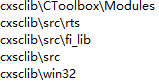
make sure the following folder is included in the project property “C/C++ –> General –> Additional Include Directories”.
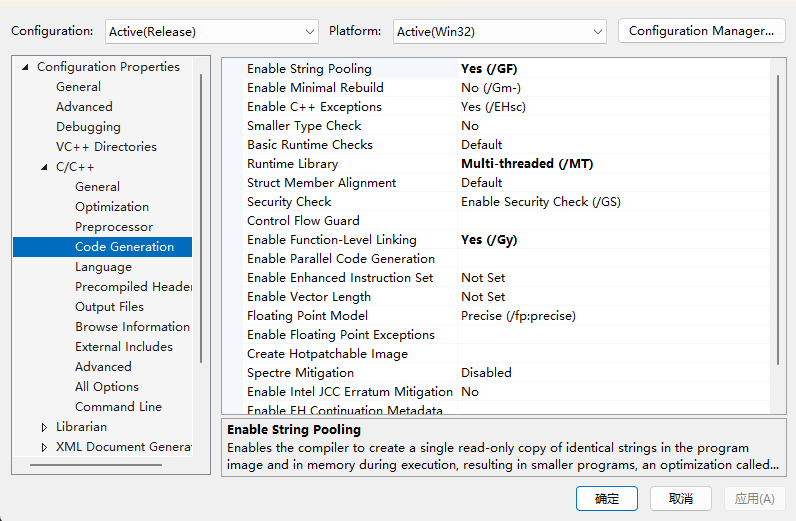
make sure the project property “C/C++ –> Code Generation –> Runtime Library” is set to “Multi-Threaded (/MT)” for building and using static library.
build cxsc project in vs2026

3. Build yalaa library from source
unzip the yalaa-master.zip to a folder, such as “yalaa-master”.
use the vs2026 to open the project file “trunk.sln” in the unzipped root folder.
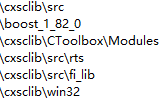
make sure the following folder is included in the project property “C/C++ –> General –> Additional Include Directories” for both “yalaa” and “demo” solution.
make sure the project property “C/C++ –> Code Generation –> Runtime Library” is set to “Multi-Threaded (/MT)” for building and using static library for both “yalaa” and “demo” solution.
make sure the following two folders is added to “yalaa” project property “Librarian –> General –> Addtional Library Directories” and “demo” project property “Linker – > General –> Additional Library Directories”
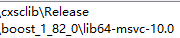
make sure the following folder is added to “demo” project property “Linker – > Input –> Additional Dependencies”

build the “demo” solution which builds the “yalaa” solution at the same time.
